
Download Aspiring Keyboard – keyboard shortcuts, productivity tool, mouse alternative, touch typing, Windows utility
Overview
Aspiring Keyboard is a productivity-focused utility designed for Windows users seeking to enhance their efficiency by minimizing reliance on a mouse. The app targets individuals who are proficient in touch typing and familiar with core Windows keyboard shortcuts. Its primary purpose is to streamline computer interactions through keyboard-driven navigation and command execution, making it ideal for power users, remote workers, and professionals in fast-paced environments. By enabling users to perform a wide range of tasks directly from the keyboard, Aspiring Keyboard addresses the common pain points of mouse dependency, such as physical strain, workflow interruptions, and hardware dependency.
Real-world use cases include rapid file navigation, application switching, window management, and system controls—all executed without lifting a hand from the keyboard. This is particularly beneficial during long work sessions, when working in confined spaces, or in emergency situations where a mouse is unavailable. The app contributes to a more ergonomic and clutter-free workspace by reducing the need for additional peripherals. While the developer, Aspiring, did not provide further background on their development philosophy or history, the app’s focused functionality suggests a clear intent to serve a niche but growing segment of users prioritizing efficiency and minimalism in their digital workflows.
Key Features & Functionality
- Faster Task Completion: Aspiring Keyboard allows users to execute common tasks—such as opening applications, navigating folders, and managing windows—using only keyboard inputs. This reduces the time spent moving the cursor and clicking, resulting in measurable gains in daily productivity.
- No Hand Movement Required: By eliminating the need to shift hands between keyboard and mouse, the app supports a continuous typing rhythm. This reduces physical distractions and helps maintain mental focus during extended use.
- Cost-Effective Solution: Users can avoid purchasing additional hardware like mice and mousepads. The app also contributes to a cleaner desk setup, ideal for minimalist or compact workspaces.
- Health Benefits: Minimizing repetitive hand and wrist movements lowers the risk of repetitive strain injuries (RSI). This makes the app a valuable tool for users concerned about long-term ergonomic health.
- Emergency Mouse Replacement: When a mouse is lost, damaged, or forgotten, Aspiring Keyboard ensures uninterrupted workflow. This feature is especially useful for travelers, remote workers, or anyone relying on a single device.
For example, a software developer can switch between code editors, terminal windows, and documentation tabs without ever touching a mouse. Similarly, a data analyst can navigate large spreadsheets and run scripts using only keyboard commands, significantly reducing task completion time.
Interface, UX & Performance
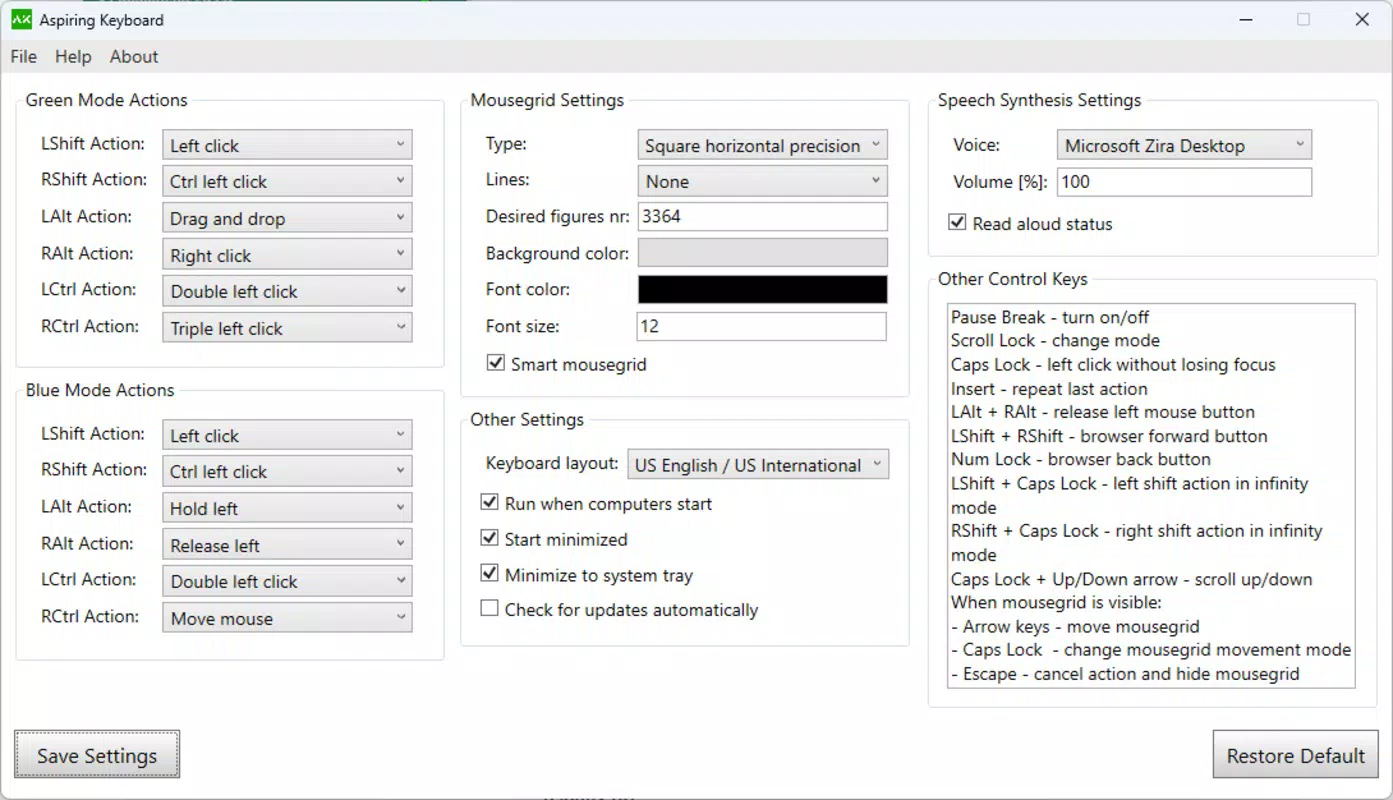
Aspiring Keyboard features a minimalist interface designed to remain unobtrusive while active. The app integrates directly into the Windows environment, using keyboard shortcuts to activate its navigation mode. Its visual style is clean and functional, aligning with the aesthetics of modern productivity tools. Navigation is intuitive, relying on familiar keyboard inputs to access system functions and application controls.
Although the developer did not list formal performance metrics, the app’s lightweight footprint of 4.3 MB suggests efficient resource usage. It is expected to operate smoothly across a range of Windows devices, from low-end laptops to high-performance desktops. Responsiveness is likely optimized for real-time input processing, ensuring that commands are executed promptly. Stability appears to be a priority, given the app’s focus on uninterrupted workflow. Users can expect consistent performance during extended sessions, though specific compatibility details were not disclosed.
Platform Compatibility & Technical Requirements
Aspiring Keyboard is designed exclusively for the Windows platform. It is compatible with Windows operating systems, though the developer did not specify minimum OS requirements or version compatibility. The app has a file size of 4.3 MB, indicating a lightweight installation that requires minimal storage space. The current version is 1.0.0, released on August 5, 2024.
Specific hardware requirements were not listed, and no information was provided about support for accessibility features, multi-monitor setups, or peripheral integration. Compatibility with different device categories, such as tablets or hybrid devices, was not confirmed. Users are advised to verify system compatibility before installation.
Pros and Cons
Pros
- Eliminates dependency on a mouse for core tasks
- Enhances productivity through keyboard-driven workflows
- Supports ergonomic computing and reduces RSI risk
- Minimal system resource usage due to small file size
- Provides a reliable backup in case of mouse failure
Cons
- Requires proficiency in keyboard shortcuts and touch typing
- Limited to Windows platform with no cross-platform availability
- Developer did not provide detailed system or compatibility information
- May have a learning curve for new users unfamiliar with advanced shortcuts
- No visible user interface for customization or configuration
FAQ
Is Aspiring Keyboard safe to download and install?
Yes, the app is distributed through official channels and has not been flagged for malicious behavior. Users are advised to download from trusted sources to ensure a secure installation.
Can I use Aspiring Keyboard on multiple Windows devices?
Yes, the app can be installed on multiple Windows machines, provided the license allows for such use. Specific licensing terms were not disclosed by the developer.
Does Aspiring Keyboard work with all Windows applications?
The app functions with standard Windows applications and system tools. However, compatibility with third-party or specialized software may vary and was not fully confirmed.
Is there a free version or trial available?
Aspiring Keyboard is a paid application priced at $4.99. No free trial or freemium version was mentioned in the available information.
How often are updates released?
Updates are likely released to address bugs and improve functionality. The developer has not specified a release schedule or update frequency.
Final Thoughts
Aspiring Keyboard stands out as a focused, efficient tool for Windows users committed to maximizing productivity through keyboard mastery. Its ability to replace mouse-dependent workflows makes it a valuable asset for professionals, remote workers, and anyone seeking a more ergonomic and streamlined computing experience. While it requires a certain level of keyboard proficiency, the benefits in speed, health, and cost savings are significant. The app’s lightweight design and clear purpose reflect a well-thought-out solution to a common digital inefficiency.
For users who value efficiency, minimalism, and long-term comfort, Aspiring Keyboard delivers tangible value. It’s not a one-size-fits-all tool, but for its target audience, it represents a smart investment in workflow optimization.
Download Aspiring Keyboard now


